


AI Cover&Music Maker · Bach AI
4.162.00 Reviews
App Specs
- Version
- 1.1.4
- Updated On
- License
- Free
- Downloads
- 100,000+
- Developer
- AI Chat Studio
- Categories
- Music & Audio
- Platform
- Android
Screenshots
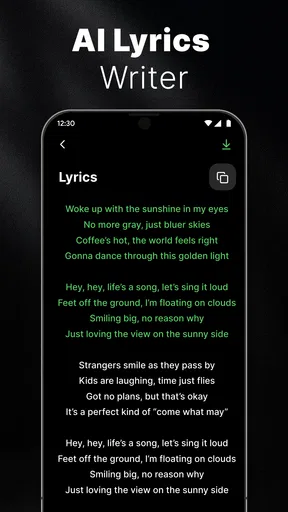
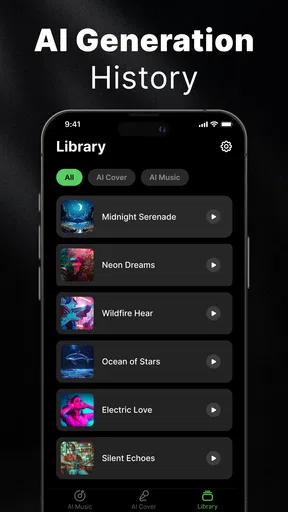
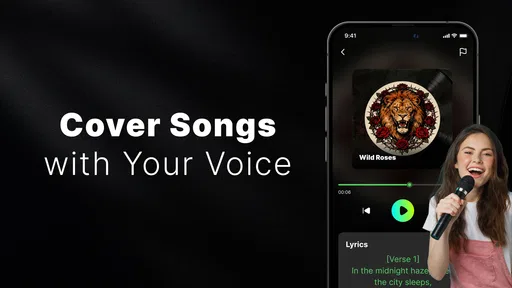
 Analysis by AppCompare
I’m wary of music apps that promise to turn an idea into a finished track with almost no effort, because the gap between a fun demo and something you can actually use can be wide. AI Cover&Music Maker · Bach AI is aimed at people who want to experiment with AI-generated covers and music, rather than replace a full recording setup. That makes it most interesting as a creative sketchpad: a place to try a musical direction, hear how a concept might feel, and decide whether it is worth developing further.
Getting Started with AI Cover&Music Maker · Bach AI
Jumping into the app is as easy as pie. Once you download it, you're greeted with a sleek and intuitive interface. There's no need to be a tech whiz to navigate through it. The app guides you every step of the way, making sure you’re never lost in the process. It's almost like having a musical maestro by your side.
You start by choosing whether you want to create a cover or compose original music. If you’re anything like me, you might find yourself torn because both options are equally tempting. But let’s dive a little deeper into what each option offers.
Choosing a First Experiment
For a first session, I’d keep the idea small rather than trying to produce a complete song. Pick one clear goal: test a vocal character, explore a genre shift, or sketch a short musical idea. That gives you a useful way to judge whether the result is heading in the direction you wanted, instead of getting distracted by several changes at once.
This is also a sensible way to learn what the app is asking you to provide. Before recording or importing audio, decide whether the source is something you are comfortable using in an AI music workflow. If it is a personal voice memo or a recording involving other people, think about permission and privacy before sending it anywhere. I would avoid treating a casual experiment as a reason to upload audio you would not want handled by a third-party service.
Crafting the Perfect Cover
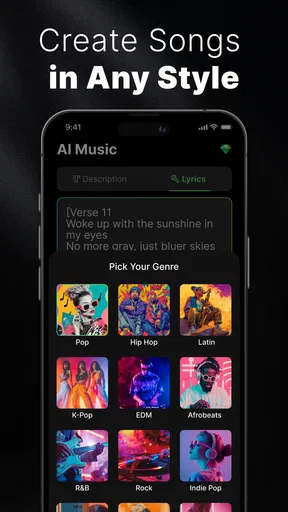
Creating a cover is a breeze with the app. You can select from a variety of genres and instruments to match your style. The app’s AI then works its magic, analyzing the original track and suggesting tweaks to give it your personal touch. It’s like having a mini recording studio in your pocket!
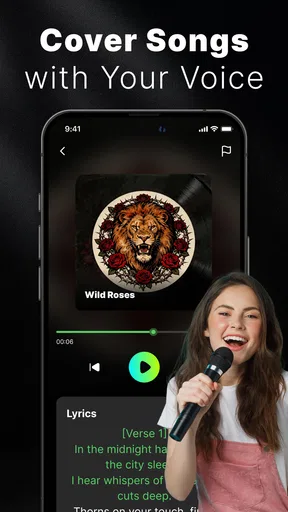
One feature I absolutely loved is the ability to layer vocals and instruments. You can record your voice directly through the app or import audio files. The AI helps you blend them seamlessly, ensuring everything sounds pitch-perfect. And trust me, if I can sound good with this app, anyone can!
Worth Reading Before You Choose

Baby Panda World Brings Quick Play to Modern Phones, but Its Game Library Feels Busy

ESPN’s Live Game View Makes Following Close Games Easier

QuizzLand Review: A Good Fit for Short Trivia Breaks, Not Every Player

Basketball Stars: Multiplayer Is Fast, but Can It Recover When Matches Go Wrong?

WEBTOON Turns Phone Updates Into a Better Reading Routine

Link to Windows Runs on Shared Habits, Not Social Feeds
For a more useful test, compare a few restrained versions rather than asking for a dramatic transformation immediately. A cover can lose the character you liked in the source if too many stylistic choices change at once. I’d begin with the vocal or instrumental quality that matters most to you, listen for that element, and then try another direction only if the first pass gives you a clear reason to do so.
There is a practical distinction between a playful cover and a release-ready recording. An AI-assisted blend can be enjoyable to share privately, but a public upload raises separate questions about rights to the source material and the voice being imitated. I would not assume that making a cover in an app automatically clears those questions. If you plan to publish, check the relevant permissions and platform rules first.
Composing Original Music
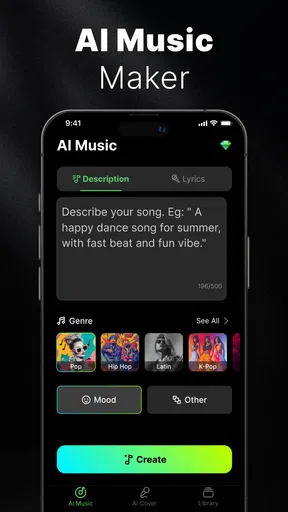
If creating something entirely new is more your jam, then you’re in for a treat. The app offers a composition tool that allows you to play around with melodies, harmonies, and rhythms. You don’t need to be a Beethoven to compose a symphony here. The AI provides suggestions and corrections, making sure your music is always in tune.
What's cool is the ability to experiment with different musical styles. Want to mix a little jazz with some classical vibes? Go for it! The app encourages creativity and exploration, which is perfect for budding musicians and seasoned pros alike.
For an everyday use case, imagine having a melody in your head while walking home, then opening the app later to see whether it can become a fuller musical sketch. I would treat that result as a starting point, not a final arrangement: keep a note of the idea you wanted to preserve, listen for what the AI changes, and decide whether the generated direction still fits. This makes the tool useful even when the output is not exactly what you imagined, because it can help you notice a new route to explore.
One trade-off is that guided suggestions can make it easy to accept an arrangement simply because it sounds polished. If you have a specific rhythm, progression, or vocal phrasing in mind, listen closely for whether it survived the process. A beginner may value the app’s help getting past a blank page; someone with a precise arrangement already planned may prefer a conventional music editor that gives more direct control over individual parts.
The AI Advantage
What sets the app apart is its powerful AI engine. It learns from your musical preferences and adapts its suggestions accordingly. Over time, it feels like the app knows you better than you know yourself. It’s like having a musical companion that grows with you.
Another impressive aspect is the app’s ability to understand musical nuances. It doesn’t just throw random chords together. Instead, it pays attention to the structure and flow of your composition, ensuring that everything aligns harmoniously.
I would still approach claims of personalization with a practical ear. The best way to decide whether a suggestion suits you is to compare the output with your own intention, rather than assuming the app has inferred a stable musical taste. If a result misses the mark, try changing one aspect at a time; that makes it easier to tell whether the issue was the style, the source, or the overall direction.
That approach also helps avoid spending time on endless variations. Save or export a version when it captures something you like, then experiment from a fresh idea rather than repeatedly nudging a track without a clear goal. For casual creators, the real value may be the speed of trying possibilities; for musicians who need fine-grained editing, a dedicated digital audio workstation is likely the better place to finish the work.
Trust, Choices, and Practical Caution
Because this app works with music and may involve recorded or imported audio, trust is part of the creative decision, not an afterthought. I would review the permissions requested on the device and consider whether each one makes sense for the action I am taking. I would also look for the app’s privacy information and account controls before adding sensitive recordings or making a purchase. Those checks are more useful than guessing what happens to a file after upload.
If you are recording another person, get their agreement before using their voice. If you are working with a song you do not own, keep the experiment personal unless you have checked the rights needed for wider sharing. These are not reasons to avoid trying the app; they are sensible boundaries for any tool that can transform audio and make a result easy to pass along.
The clearest user choice is the one you make before starting: use a low-stakes idea first, and decide what you are comfortable supplying. I would not put confidential voice notes, unreleased client material, or anything tied to someone else’s private conversation into a creative app without first understanding its data practices. That caution applies even if the interface feels friendly and the creation process is quick.
Sharing Your Masterpiece
Once you’re satisfied with your creation, sharing it with the world is just a tap away. The app allows you to export your tracks in high-quality audio formats, ready to be uploaded to your favorite platforms or shared with friends. There’s something incredibly satisfying about seeing your work go from an idea to a polished track.
The app even offers a community feature where you can connect with fellow musicians, share your work, and get feedback. It’s a vibrant space buzzing with creativity and collaboration.
Sharing is most rewarding when you have a clear audience in mind. Sending a playful draft to a friend is different from posting a cover publicly or using generated music in a commercial project. Before you share, listen once more for unexpected changes and consider whether your source material and any recognizable voice are appropriate for that audience. If your priority is a controlled studio workflow or detailed mastering, export-and-finish work in a dedicated audio editor may suit you better than relying on an all-in-one creation app.
Who Will Get the Most from It?
The app is a good fit for curious listeners, beginners who want a low-pressure way into music making, and songwriters who need a quick prompt when an idea feels unfinished. Its cover and composition paths address different moods: one lets you play with a familiar musical starting point, while the other gives you room to explore something new. I’d recommend it to a friend who values experimentation more than precise production control.
I would be more cautious about recommending it to someone who needs detailed track editing, predictable professional results, or a complete substitute for a recording studio. The same goes for anyone unwilling to review privacy choices before working with personal audio. Traditional recording software is less immediate, but it can be a better fit when control, repeatability, and a clear production chain matter more than quick AI suggestions.
It is free to install, though in-app purchases range from $3.99 to $199.99 per item, so I would check the purchase screen carefully before committing to anything. The app is from AI Chat Studio, is rated for Everyone, and has a four-point-zero average from around 590 ratings, with over 100,000 installs. Those figures suggest it has found an audience, but they do not tell me whether a particular feature or paid option will suit your needs. I’d try the basic creative workflow first and decide from your own results.
Final Thoughts
All in all, AI Cover&Music Maker · Bach AI is a fantastic tool for anyone looking to delve into the world of music creation. Whether you’re a complete newbie or a seasoned musician, there’s something here for everyone. The app combines ease of use with powerful features, making it a must-have for music enthusiasts.
So, why not give it a shot? Download it now and unleash your inner musician. Who knows, maybe the next big hit is just a few taps away!
My more cautious verdict is that it is best approached as a convenient creative companion, not a promise of instant professional production. Its appeal is the chance to explore covers and original ideas without starting from a blank technical setup; its limits are the usual ones around creative control, source rights, and being thoughtful with audio you choose to use. The current version is 1.1.1 and requires Android 7.0 or later, which makes it accessible to a broad range of Android users. If you are comfortable experimenting, check the choices in the app and begin with an uncomplicated idea. If you need exact control or are not comfortable with the handling of your audio, a conventional editor—or simply keeping the idea in a private notebook—is the wiser option.
Pros
- Easy-to-use interface for seamless music creation.
- Variety of AI-generated music styles available.
- Quick export options to multiple formats.
- No musical experience required to create tracks.
- Regular updates with new features and improvements.
Cons
- Limited free features; subscription required for full access.
- Occasional lag in rendering complex compositions.
- No offline mode; internet connection needed.
- Limited customization for more advanced users.
- Some genres lack depth and diversity.
FAQs for AI Cover&Music Maker · Bach AI
What is AI Cover&Music Maker · Bach AI?
AI Cover&Music Maker · Bach AI is a cutting-edge app designed for music enthusiasts and creators. It allows users to generate music covers and create original compositions using artificial intelligence. The app offers a user-friendly interface and a variety of tools to enhance your musical creativity, whether you're a beginner or a professional.
How does AI Cover&Music Maker · Bach AI work?
The app utilizes advanced AI algorithms to analyze and process musical input. Users can upload their own music or use the app's built-in templates to create covers. The AI then suggests edits, harmonies, or even new compositions, providing a seamless blend of technology and creativity. It's a great tool for experimenting with music creation.
What features does AI Cover&Music Maker · Bach AI offer?
AI Cover&Music Maker · Bach AI boasts a wide array of features, including AI-generated harmonies, customizable templates, and real-time collaboration options. Users can also access a library of sounds and effects to enhance their music. The app supports multiple file formats, making it easy to export and share your creations.
Is AI Cover&Music Maker · Bach AI suitable for beginners?
Yes, the app is designed to cater to both beginners and experienced musicians. Its intuitive interface and guided tutorials make it easy for newcomers to start creating music. At the same time, advanced features and customization options provide depth for more skilled users, ensuring a versatile experience for everyone.
What are the system requirements for AI Cover&Music Maker · Bach AI?
AI Cover&Music Maker · Bach AI is compatible with both Android and iOS devices. It requires an up-to-date operating system, typically Android 8.0 or higher and iOS 12.0 or later. The app is optimized for both smartphones and tablets, ensuring a smooth experience across different devices.


